
A step-by-step guide on how to format resume submissions in 2026 at recruitment firms—covering structure, ATS-friendly rules, anonymisation, file handling, and how agencies scale formatting with automation.
Recruitment firms move fast.
Clients expect shortlists quickly.
Hiring managers scan CVs in seconds.
And every submission reflects your agency’s standards.
That’s why knowing how to format resume submissions properly is no longer a “nice to have” in 2026—it’s part of operational excellence.
In this guide, we’ll walk through a practical, recruiter-friendly process for formatting resumes for client submission:
what to standardise, what to avoid, how to anonymise, how to keep CVs ATS-friendly, and how modern firms scale formatting without drowning recruiters in admin.
What “How to Format Resume” Means at Recruitment Firms
In a recruitment firm, formatting isn’t about making a candidate’s resume look “pretty.”
It’s about making every resume:
- easy to scan for hiring managers
- consistent across your team
- aligned with client expectations
- safe to share (privacy + compliance)
- fast to produce under pressure
A well-formatted resume improves clarity.
A repeatable formatting process improves speed.
Step 1: Start With a Branded Template (Not a Blank Word Doc)
If you want consistency, start with a template that enforces it.
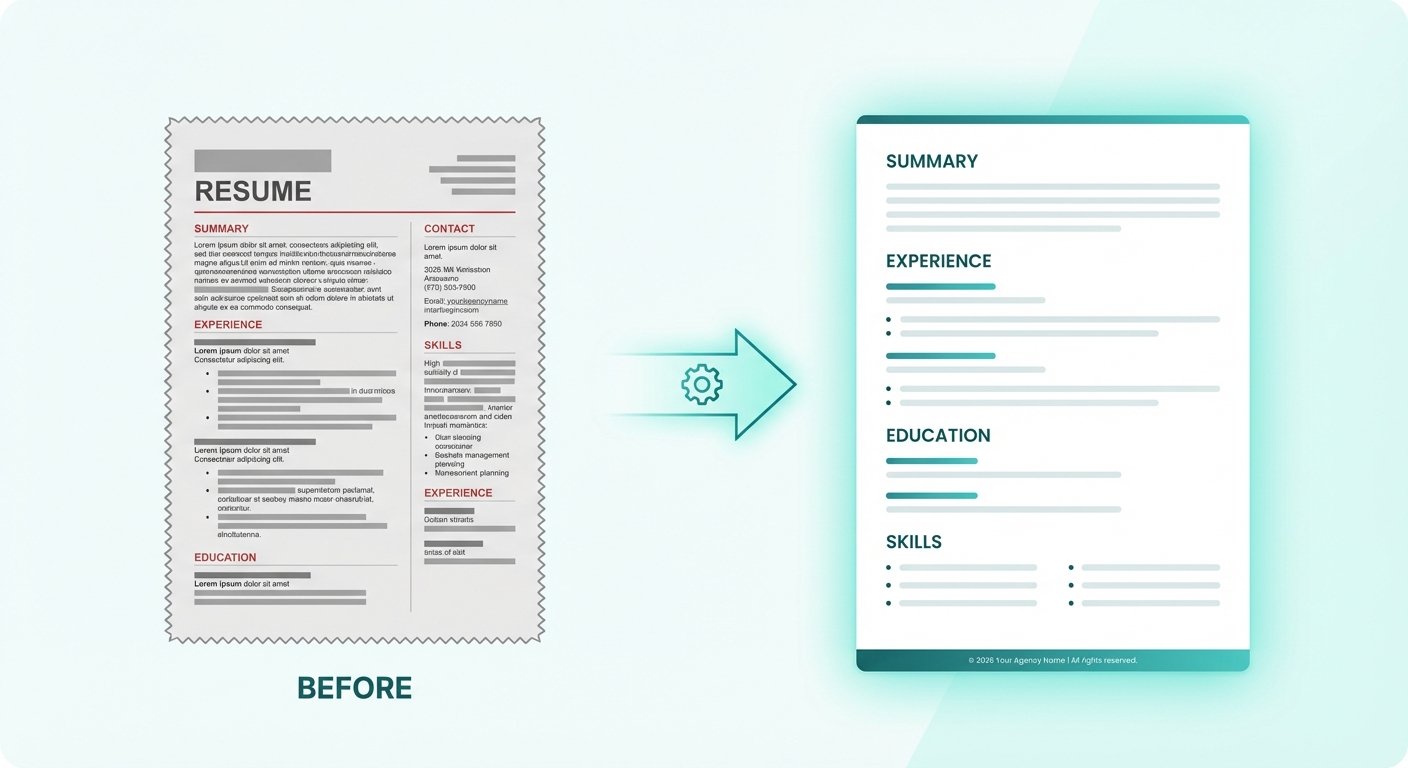
In 2026, most recruitment firms format resumes using one of these:
- an agency-branded submission template
- a client-specific template (large accounts often require this)
- an anonymised template (for blind submissions)
What a good recruitment resume template includes
- consistent section order (Summary → Experience → Education → Skills)
- stable spacing and margins (easy scanning)
- clear headings (ATS-friendly and human-friendly)
- optional agency header/footer (when appropriate)
What to avoid
- two-column layouts for client submissions
- icons, charts, heavy graphics
- text boxes and tables that break when edited
Templates should reduce decisions, not create more work.
Step 2: Standardise Resume Sections (The Structure Clients Expect)
Recruitment firms win trust through clarity.
That starts with consistent structure.
Here’s a practical 2026 structure that works across most sectors.
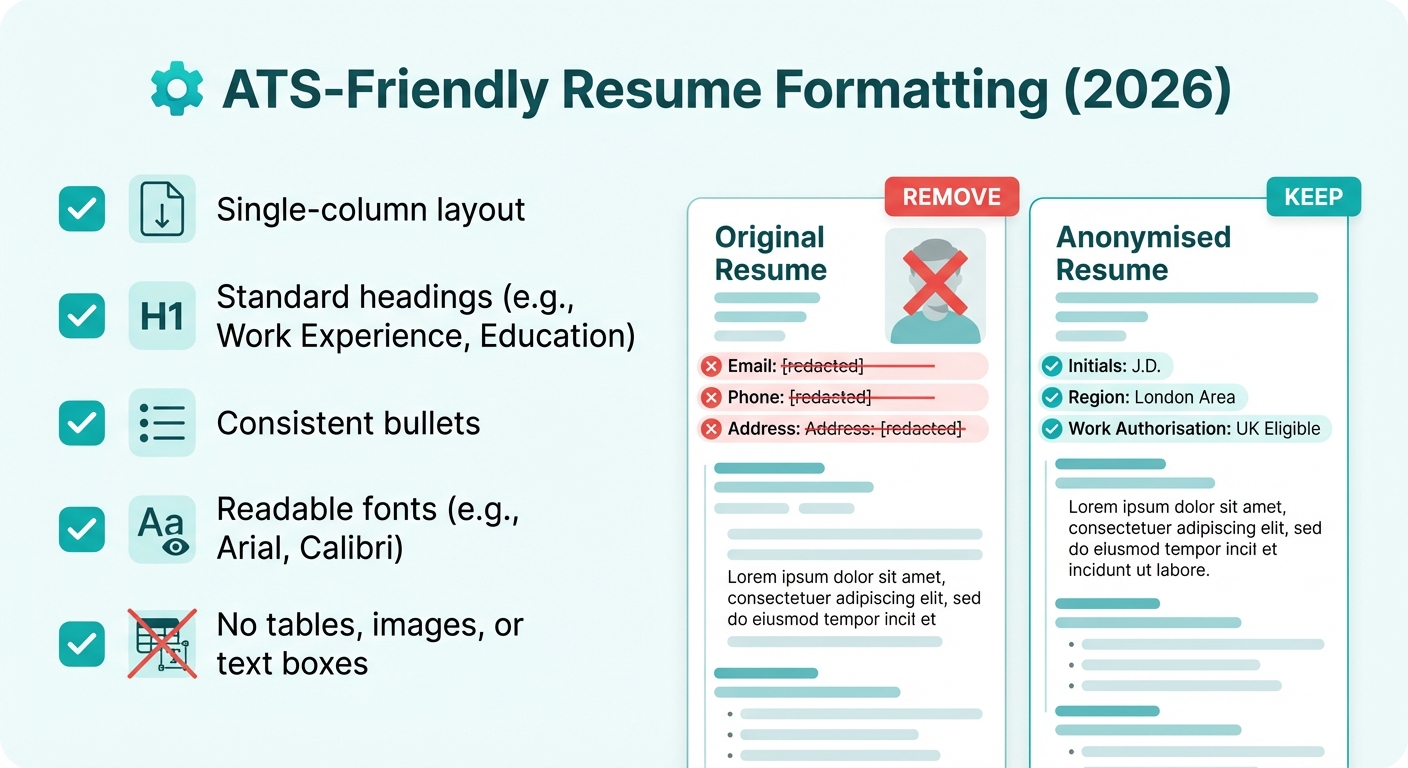
Contact Info (and Anonymisation Rules)

For recruitment submissions, contact info needs a firm rule:
- either include full candidate details (only when allowed), or
- anonymise consistently (common in enterprise, consulting, public sector)
Best practice: anonymised-by-default submission format
Include:
- first name or initials (depending on your policy)
- location (city/region only)
- work authorisation (if relevant)
- LinkedIn (optional, only if policy allows)
Remove:
- phone number
- email address
- full street address
- photo (unless required by region/client policy)
A good formatting SOP includes a clear “what stays vs what goes” policy.
Professional Summary (3–5 Lines That Sell the Candidate)
A resume summary is not a biography.
It’s a short positioning statement for client scanning.
A strong submission summary usually includes:
- target role or specialization
- years of experience
- 2–3 strengths aligned to the role
- 1 proof point (achievement, scope, impact)
Example structure:
- “X years in Y”
- “Specialised in A, B, C”
- “Known for result D”
Keep it tight. Make it skimmable.
Work Experience (Clean, Consistent, Outcome-Led)
Work experience is where formatting breaks most often.
Standardise these elements:
- job title (consistent case)
- company name
- dates (single format across the CV)
- location (optional)
- bullet style (one bullet system only)
Bullet formatting rules (simple and effective)
- 3–6 bullets per role for recent positions
- lead with outcomes, not responsibilities
- keep bullets aligned and consistent length
- avoid dense paragraphs
If recruiters need to “fix formatting” manually, this is usually the section causing it.
Education (Simple, Clean, and Consistent)
Education should be predictable and uncluttered.
Standardise:
- degree + subject
- institution name
- dates (optional, based on policy)
- location (optional)
Remove:
- long module lists
- irrelevant older certificates
- excessive formatting
The goal is clean scanning and consistent hierarchy.
Skills (Client-Friendly, Role-Relevant)
Skills sections get messy fast—especially when candidates paste long keyword lists.
For client submissions, keep skills:
- grouped by category
- limited to role-relevant skills
- consistent across CVs
A simple skills structure:
- Technical Skills
- Tools / Platforms
- Industry / Domain
- Soft Skills (optional, only if meaningful)
Avoid:
- long comma walls
- skill bars and charts
- duplicated skills across sections
Step 3: Apply ATS-Friendly Formatting Rules (Even for Client Submissions)
Even if a CV is going to a client, ATS-friendly formatting protects you.
Why?
- clients often upload your submission into their ATS
- clean structure reduces parsing errors
- consistent headers help scanning
ATS-friendly rules that work in 2026:
- use standard section headings (Summary, Experience, Education, Skills)
- keep layout single-column
- avoid text boxes and tables
- keep fonts professional and readable
- use consistent bullet styles
A CV that is ATS-friendly is usually also client-friendly.
Step 4: Proofread Like a Submission Team (Not Like a Candidate)
Recruitment firms aren’t proofreading for “grammar perfection.”
They’re proofreading for submission risk.
Your submission-proof checklist should include:
- spelling and obvious grammar issues
- date format consistency
- role titles match what the candidate claims
- tense consistency (past roles past tense, current role present)
- spacing and alignment consistency
- removed personal contact details (if anonymised)
This is where resume formatting becomes operational quality control.
Step 5: Save, Name, and Export Correctly
Formatting isn’t finished until the file is client-ready.

File type rules (2026 best practice)
- DOCX for editing and ATS compatibility
- PDF for client-facing presentation (when requested)
Most firms keep both:
- DOCX master (editable)
- PDF submission (final)
Naming conventions (reduce confusion instantly)
A practical recruitment naming format:
CandidateName_Role_Client_YYYY-MM-DD.pdf- or anonymised:
CandidateInitials_Role_Client_YYYY-MM-DD.pdf
Avoid:
- “Final_Final_v3.pdf”
- “Resume.pdf”
- inconsistent naming across recruiters
Naming is part of your workflow quality.
Step 6: Choose Your Scaling Method (How Firms Actually Do Resume Formatting)
This is where “how to format resume” becomes a business decision.
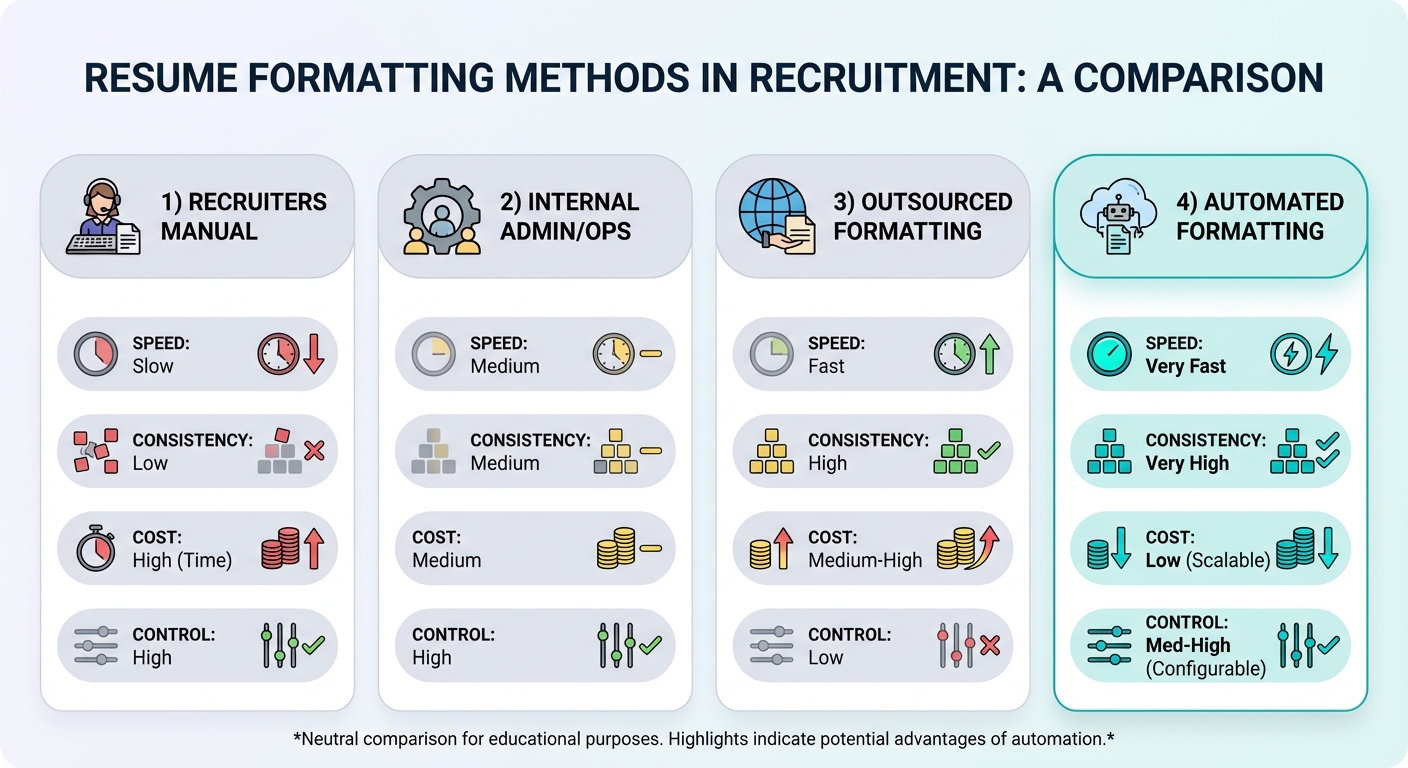
Most recruitment firms choose one of these operating models:
Option A: Recruiters format manually
Best for:
- low volume
- boutique retained search
Trade-off: - slow, inconsistent, expensive time cost
Option B: Internal admin/ops formats
Best for:
- mid-volume firms with dedicated support
Trade-off: - internal queues and delays at peak periods
Option C: Outsourced formatting
Best for:
- predictable volume, non-urgent turnaround
Trade-off: - slower feedback loops and less control
Option D: Automated resume formatting (modern standard)
Best for:
- firms scaling submissions
- teams that need consistency across recruiters
- firms that want speed without admin overload
This is where platforms like CVFormatter fit naturally.
How CVFormatter Helps Recruitment Firms Format Resumes Faster
Recruitment teams don’t want “another tool.”
They want fewer steps.
CVFormatter helps recruitment firms format resumes by turning raw inputs into consistent, client-ready CVs in seconds.
With CVFormatter, teams can:
- format raw resumes or LinkedIn profiles into branded templates
- standardise spacing, headings, and structure automatically
- apply anonymised templates when required
- reuse formatted CVs across multiple submissions
Instead of manual Word cleanup, recruiters format once and move on.
Book a free demo here.
Common Resume Formatting Mistakes Recruitment Firms Still Make
Even strong recruiters fall into these traps under time pressure:
- inconsistent date formats across roles
- mixed fonts from copy/paste
- two-column layouts that break in Word
- templates being edited differently by each recruiter
- missing anonymisation steps
- skills lists that are too long and not role-specific
The fix isn’t “try harder.”
The fix is standardisation + repeatable workflow.
FAQ: How to Format Resume Submissions at Recruitment Firms
What is the best resume format for recruitment firms in 2026?
A single-column, clearly structured format with consistent headings, clean spacing, and predictable section order. It should be easy to scan and safe to upload into ATS systems.
Should recruitment firms use branded resume templates?
Yes—branded templates improve consistency, reduce submission errors, and reinforce professionalism. They also make output quality predictable across recruiters.
Should resumes be anonymised for client submissions?
It depends on client policy and region. Many enterprise clients prefer anonymised or blind submissions. The key is using a consistent anonymisation rule across the firm.
What file type should recruitment firms submit?
DOCX is best for ATS compatibility and editing. PDF is best for final client presentation when requested. Many firms keep both.
How do recruitment firms format resumes at scale without admin overload?
They standardise templates, define a formatting SOP, and automate formatting wherever possible using tools like CVFormatter.
Final Thoughts
In 2026, knowing how to format resume submissions at recruitment firms is not a formatting skill—it’s an operational advantage.
Firms that standardise structure, anonymisation rules, and export practices move faster and deliver a more consistent client experience.
If your team is still manually formatting resumes in Word, it may be time to upgrade the workflow.
If you're ready to evaluate your options, we've put together a detailed comparison of CVFormatter against the most common CV formatting tools — covering pricing, AI features, ATS integrations, and team costs. Compare your options here.
Book a free demo to see how CVFormatter helps recruitment firms format resumes faster, keep submissions consistent, and scale without admin overload.